System features

A system that runs the whole night.

Most venue software is a box office with a calendar bolted on. This runs everything — from the guest who buys a seat three weeks out, to the host who seats them, to the owner who knows by Sunday morning exactly where the money came from.

Get to know the system.

★ Suggest seating

Seat the entire night with one button.

A deterministic plan for every unseated party — ghost-painted onto the chart, waiting for a human yes.

★ It reads the notes

It reads customer notes. And understands them.

Guests write like guests. The system understands — and shows its interpretation in plain English.

"as close as you can to my other reservation…"→ near guest's other booking · same section
★ The analyst

Ask the system anything.

Live data, never a stale export — and it shows exactly what it checked.

How's Saturday looking?
91% sold — the Swamp is bought out.
★ Upsells

Every booking is an order waiting to grow.

Buckets and gift cards ride the checkout — and the dashboard proves what works.
Buying a seat

Friction-free from craving to confirmation.

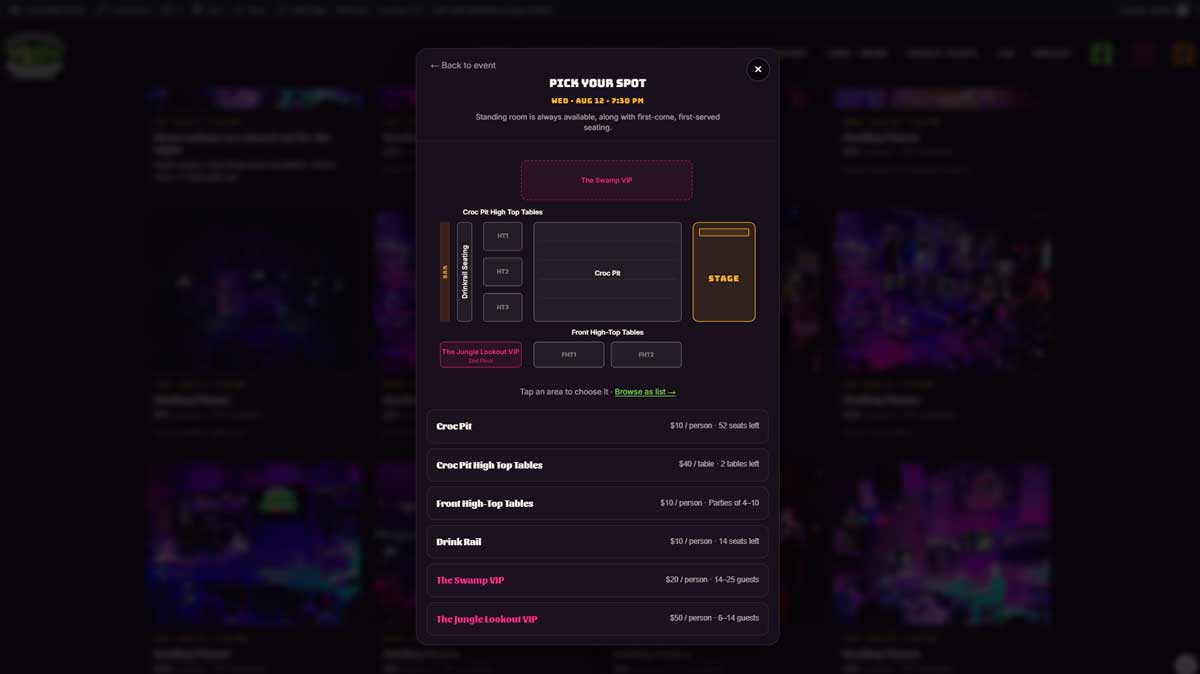
Pick a spot on a map of the real room. Apple Pay. No account. QR in the email.
The calendar

The website updates itself.

Real dates, real prices, honest availability. Nobody edits a page to keep it true.

The door

One scan, whole party.

Signed QR codes — a screenshot of somebody else's ticket doesn't get in.

SCANOne code admits the linked party
SEARCHBy name or confirmation, from a phone
SIGNEDScreenshots don't get in
The floor

The real room, on a tablet.

Drag parties onto tables. Check-ins blink until seated. Notes physically can't be missed.
★ Merch

A store without a warehouse.

Print-on-demand storefront. No stock, no boxes, no reconciliation by hand.

ORDERTee · printed & shipped on demand
STATUSFlows back automatically
STOCKNone. Ever.
While everyone sleeps

The night shift that never calls out.

Backups, note prep, rosters, releases — on schedule, unattended.

3:00 AMFull database backup
6:00 PMNotes read ahead of service
6:15 PMRoster emailed to management
Sell the room

Sold the way your floor actually works.

A show room isn't a theatre — nobody wants seat 14J. They want the pit, or a high top, or the VIP section for my sister's fiftieth. So the room sells by area, each with its own billing: per seat, per stool, whole table, private buyout. Here's how one real room is configured:

AreaHow it sells
Croc PitPer seat, five rows, row 1 hugging the stage
Drink RailPer stool along the bar
High TopsWhole table
The Swamp VIPPrivate buyout, 14–25 guests
Jungle Lookout VIPPrivate balcony buyout

Each area carries its own billing model — per seat, per stool, whole table, private buyout — and any area can be switched on or off for a single date. New Year's Eve gets its own prices and its own layout without touching an ordinary Tuesday.

Two people cannot buy the same seat. The row locks for the instant a sale completes, load-tested against dozens of simultaneous buyers. Oversells aren't rare here — they're impossible.

Buying a seat

Friction-free from craving to confirmation.

Guests pick their area on a map of the real room, say whether they want to be near the stage, and add drink buckets or gift cards on the way through — the whole order in one flow.

Seats hold for ten minutes while they check out, then release automatically. Inventory is never hostage to an abandoned cart.

Card, Apple Pay, Google Pay, Link. No account, no password. The ticket lands by email with the QR embedded in the message — nothing to download, nothing to dig out of an attachment, nothing to fumble at the door.

Tonight's show on sale — live zones, live prices, sold-out badges and all
The calendar

The website updates itself.

The public site shows a live calendar: real dates, real prices, real availability. When a night sells out, the website says so. When the owner names a night "Featuring Marty Richardson," the website says that too.

Nobody edits a web page to keep it true. Closed holidays never appear. A night booked for a private party shows as unavailable instead of vanishing and confusing the regulars.

Every night is its own event — individually named, individually priced, any area on or off for that date alone.

The venue's own website selling the room: live dates and the spot picker
The venue's own site, selling the room — live dates, honest availability
The floor

The real room, on a tablet.

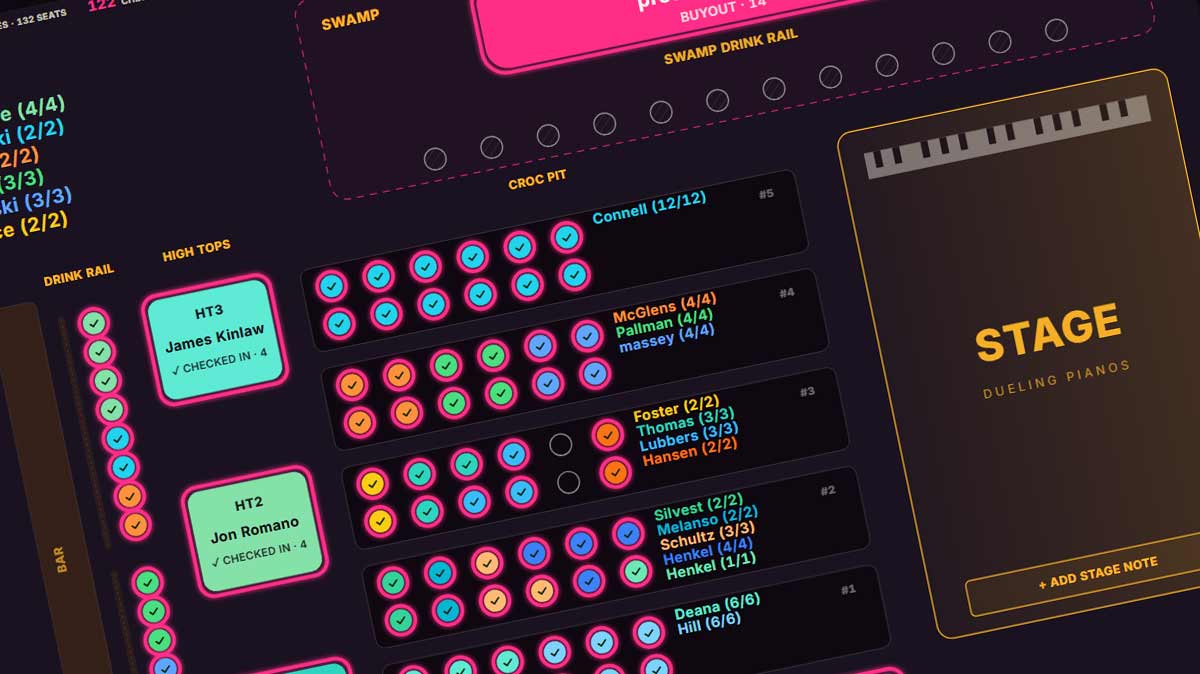
The seating chart is the real room — every zone, every table, the stage. Every party has its own colour. Drag a booking onto a table to seat it. Drag a finger down the drink rail and it fills stool by stool, stopping exactly at the party's size.

Checked-in parties blink until the host taps SEATED, so one glance across the room shows who's still wandering. Scan one member of a linked party and the whole group is in.

Booking notes cannot be missed. A party carrying a note is locked until a human opens and reads it — and if the party is unseated later, the note comes back and must be read again. This exists because notes say things like:

"one person in our party is in a scooter and cannot transfer from it"— and that is not something a host should discover at the table.
The live board, mid-service — parties landing where they belong
Suggest seating

Seat the entire night with one button.

One button — the plan paints itself onto the chart, and waits for a yes

Suggest Seating proposes a plan for every unseated party on the night, paints it onto the chart as ghost seats, and waits for a human to approve it. It isn't guesswork — the same night produces the same plan every time — and it respects the things a good host knows:

Anything it can't place is listed in plain language with the reason, for a person to handle. And it will not let anyone approve a plan until every booking note in it has been read.

It reads the notes

It reads customer notes. And understands them.

Guests write like guests: "Can you put these seats as close as you can to my other reservation (I have two high top tables as well)."

The system reads that and understands it — each note interpreted once into structured seating instructions, and what it understood is shown in plain English beside the note, so the host sees the interpretation before approving. Never a black box.

Notes with no seating meaning — "bachelor party for Vincent!" — are correctly left alone.

The note as the guest wrote it — and what the system understood
The analyst

Ask the system anything.

An assistant lives in the corner of the admin. Ask in plain language, get an answer from live data — not a stale export. Every figure comes from a real query against the current state of the business, and it shows exactly what it checked.

It reads; it never changes anything. No dashboard hunting, no exports, no waiting for someone to build a report.

A real question, answered from live data — and it shows what it checked
Upsells

Every booking is an order waiting to grow.

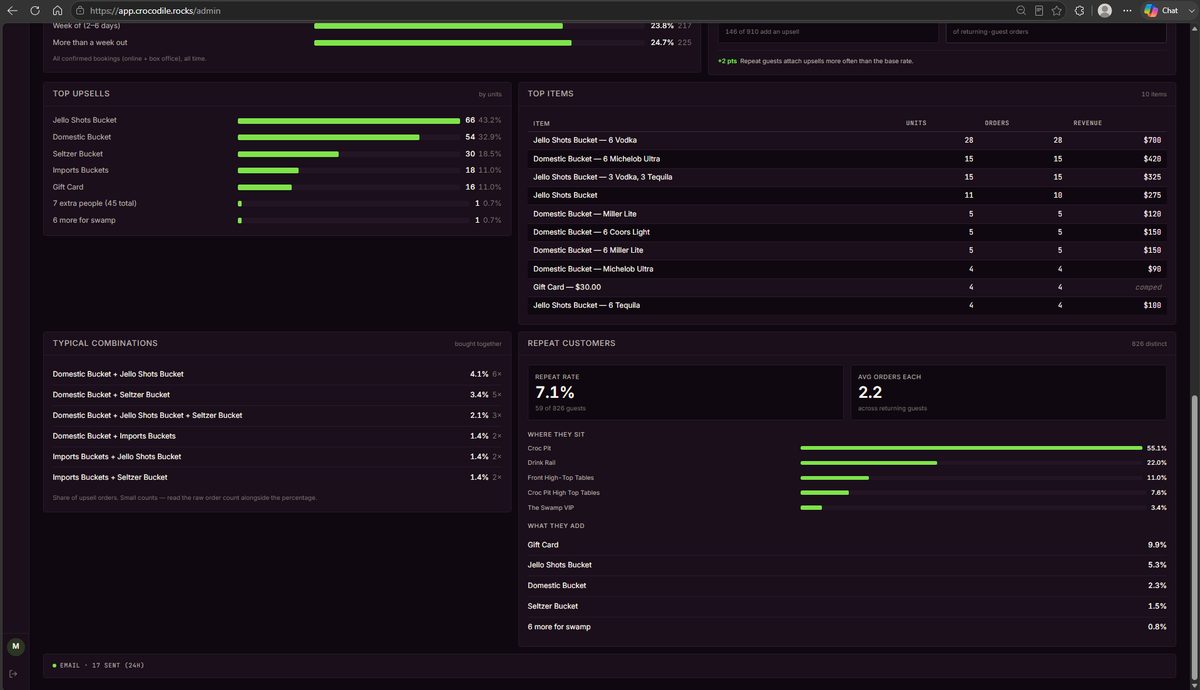
Drink buckets, gift cards, and gratuity ride the checkout — sold into the booking while the card's already out. At one venue, 146 of 910 orders added an upsell, led by the Jello Shots Bucket at a 43% share of upsell units.

And the system watches what works: which items sell, which combinations get bought together, how repeat guests behave — returning guests attach upsells more often than first-timers, and the dashboard proves it with numbers, not hunches.

None of this needed a POS integration, staff training, or a laminated card on the table. It's in the purchase flow, where the money already is.

Upsell analytics: top items, combinations bought together, repeat customer behavior
Upsell analytics — real orders, real combinations, real repeat behavior
The box office

Built for how staff really work.

Phone rings, walk-up at the door, regular who wants the usual — one screen: build a booking across several areas at once (a buyout plus thirteen pit seats, one payment), comp seats with per-section control, discount by any percentage, add guests to an existing reservation and they're seated together, attach notes that follow the booking to the host stand.

Refunds clear the party from the chart automatically. Void keeps the payment and releases the seats. Bookings move to another night, re-send, link into parties, or pull up by guest across their entire history.

Sunday morning

Know the business before the coffee's done.

The dashboard opens on the questions an owner actually asks: revenue for the last thirty days against last year, a full breakdown — admission, fees, gratuity, add-ons, comps — that reconciles to the penny, which zones earn their keep, and sell-through for every upcoming night so a soft Thursday is visible while there's still time to do something about it.

The control room — one slow scroll through a real month
Merch

A store without a warehouse.

A full storefront — product pages, cart, checkout — with orders printed and shipped on demand. No stock, no boxes in the office, no reconciliation by hand. Fulfilment status flows back automatically.

Your regulars already want the shirt. Now the venue sells it while it sleeps, and if a design doesn't sell, neither of us makes (or loses) a dime.

The storefront, in the venue's own brand — printed and shipped on demand
The door

One scan, whole party.

Scan the QR from a phone or the printed email. Scan one member of a linked party and the whole group is checked in. Search by name or confirmation code, check people in by hand, all from a phone. Tickets are cryptographically signed — a screenshot of somebody else's code doesn't get in.

While everyone sleeps

The night shift that never calls out.

3:00 AMFull database backup
6:00 PMBooking notes read ahead of service, so the host stand never waits
6:15 PMTonight's roster emailed to management
On paymentOrder confirmed, tickets issued, email sent
AlwaysAbandoned holds released back to inventory
Built for money and trust

Boring where it should be boring.

Card details never touch venue servers Every staff action attributed and logged Role-based access — door staff can't reach financials Guest notes never written to logs All money in whole cents — nothing rounds, nothing drifts Nightly backups
Book a walkthrough